How to verify domain ownership with a TXT Record on Namecheap

Quick Answer
To verify domain ownership on Namecheap using a TXT record, log in to your account, access your domain’s DNS settings, and add a TXT record with the verification value provided by the service. Once added, return to the platform and complete the verification process after the record propagates.
Steps to Verify Domain Ownership on Namecheap
1. Log in to your Namecheap account
Go to your Namecheap Acc
Click Sign In
Access your dashboard
2. Open your domain list
Click Domain List
Find the domain you want to manage
Click Manage at the far right of the domain

3. Open Advanced DNS
Click the Advanced DNS tab on the menu at the top of your screen
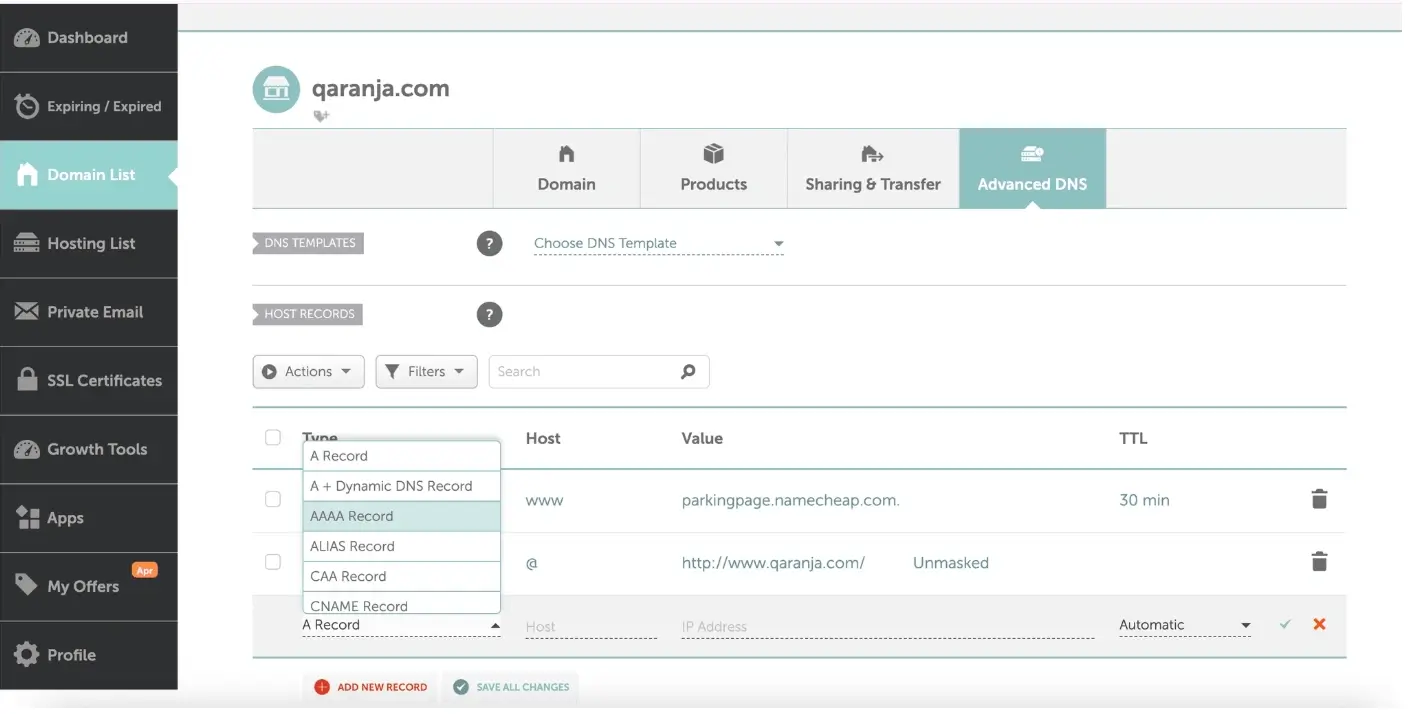
4. Add a new record
Select “Add New Record” shown in red at the bottom of your screen.
Select TXT Record

5. Enter the TXT record details
Fill in the required fields:
Host: The hostname provided (for example @, _dmarc, or google-site-verification)
Value: Paste the verification code from your service
TTL: Leave Automatic unless instructed otherwise
6. Save the record
Click the checkmark to save all changes
Return to your service (Google, email provider, etc.) and click Verify
Common Issues
- Domain suspended due to no verification
- If not completed, the domain may be temporarily suspended until verified
We regularly review and update our guides to keep them accurate. If something looks off, email guides@snagged.com and we’ll fix it.