How to add a DMARC record on Namecheap

Quick Answer
To add a DMARC record on Namecheap, log in to your account, go to Domain List, select your domain, and open Advanced DNS. Then add a TXT record with the host _dmarc and your DMARC policy.
Steps to Add a DMARC Record on Namecheap
1. Log in to your Namecheap account
Go to your Namecheap Acc
Click Sign In
Access your dashboard
2. Open your domain list
Click Domain List
Find the domain you want to manage
Click Manage at the far right of the domain

3. Open Advanced DNS
Click the Advanced DNS tab on the menu at the top of your screen
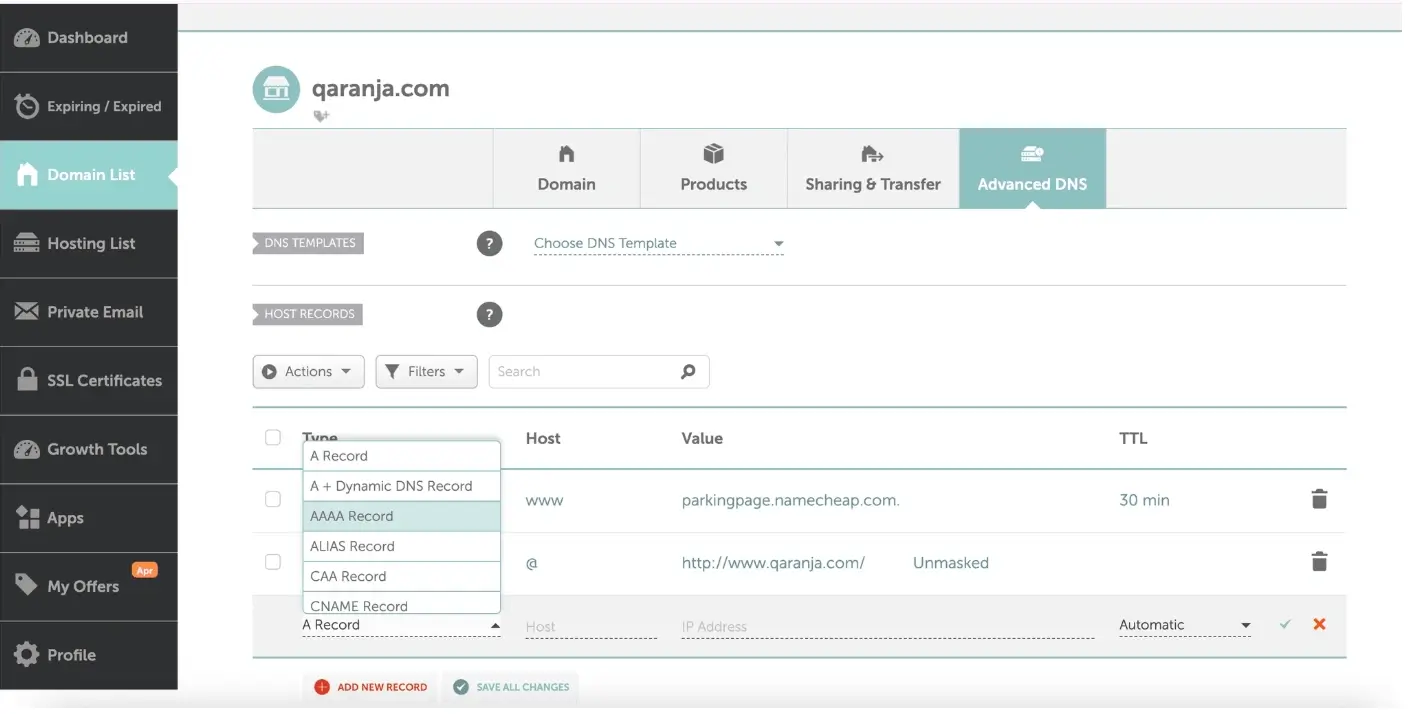
4. Add a new record
Select “Add New Record” shown in red at the bottom of your screen.
Select TXT Record

5. Enter the DMARC record details
Fill in the required fields:
Host: _dmarc
Value: your DMARC policy
TTL: Automatic unless instructed otherwise
Example DMARC record:
v=DMARC1; p=none; rua=mailto:dmarc@yourdomain.com
6. Save the record
Click the checkmark icon to save all changes
What Happens Next
DMARC records usually take effect within a few minutes, but may take up to 24 hours depending on DNS propagation.
After propagation, email providers will begin applying your DMARC policy and sending reports if configured.
Common Issues
We regularly review and update our guides to keep them accurate. If something looks off, email guides@snagged.com and we’ll fix it.